
Kontakt Scripting (KSP) :: ENGINE :: dynamic routing & bus section – ENGINE PAR OUTPUT CHANNEL
This article explains the bus section and routing. Manual routing as well as dynamic routing via ksp drop down menu and button (premium).
Download all files to this article premium
- NKI file with open script tab
- full ksp script with helpful comments
License:
KSP Script(s) licensed under the MIT License
You may use, modify, build up on the script(s), as you like (even commercially), as long as you keep all credits visible / accessible to others. If you would like to remove the credits or publish them somewhere else, please contact us
Content
-
bus section explained
-
kontakt routing map
-
manual routing
-
static routing via ksp
-
real dynamic routing via ksp premium
1. Bus section explained
 The bus section offers 16 additional channels with 8 FX slots each and an amp section with separate volume & pan controls.
So we can consider the bus section as 16-Channel Mixer with 8 FX slots each channel.
However unfortunately we can not modulate these FX with LFO or EG etc. This is only possible with the group FX.
But we can route each group individually to one of the 16 buses. So we can use up to 8 new FX slots from each of the buses.
We can route the signal either manually or via KSP. Of course also dynamically. By default the group output signal is routed directly to the instrument insert FX, bypassing the Bus section.
Each Bus’s output signal is routed to the instrument insert FX by default. It can also be be routed to the “physical” Outputs bypassing the instrument insert FX.
- there are 16 buses in total
- we can route any group to one of those 16 buses (see routing)
- we can route dynamically via ksp (see dynamic routing)
- each bus has an own amp section (vol, pan) and an own insert FX section with 8 FX slots
- these FX have no access to modulators (like LFO / EG)
this is because modulators are only available on the group level not on the bus or instrument level - each bus output can be routed to the instrument insert FX or to the “physical” instrument outputs, bypassing the instrument insert FX
2. Routing Map

Basically we can route the group signal either to buses, to the instrument insert FX or directly to the “physical” instrument outputs of Kontakt.
Also see channel selectors and routing below
3. MANUAL ROUTING
- within a group select output.

- select one of the buess or select one of the instrument outputs
- select the related bus, the group has been routed to and add some FX or change the volume / pan
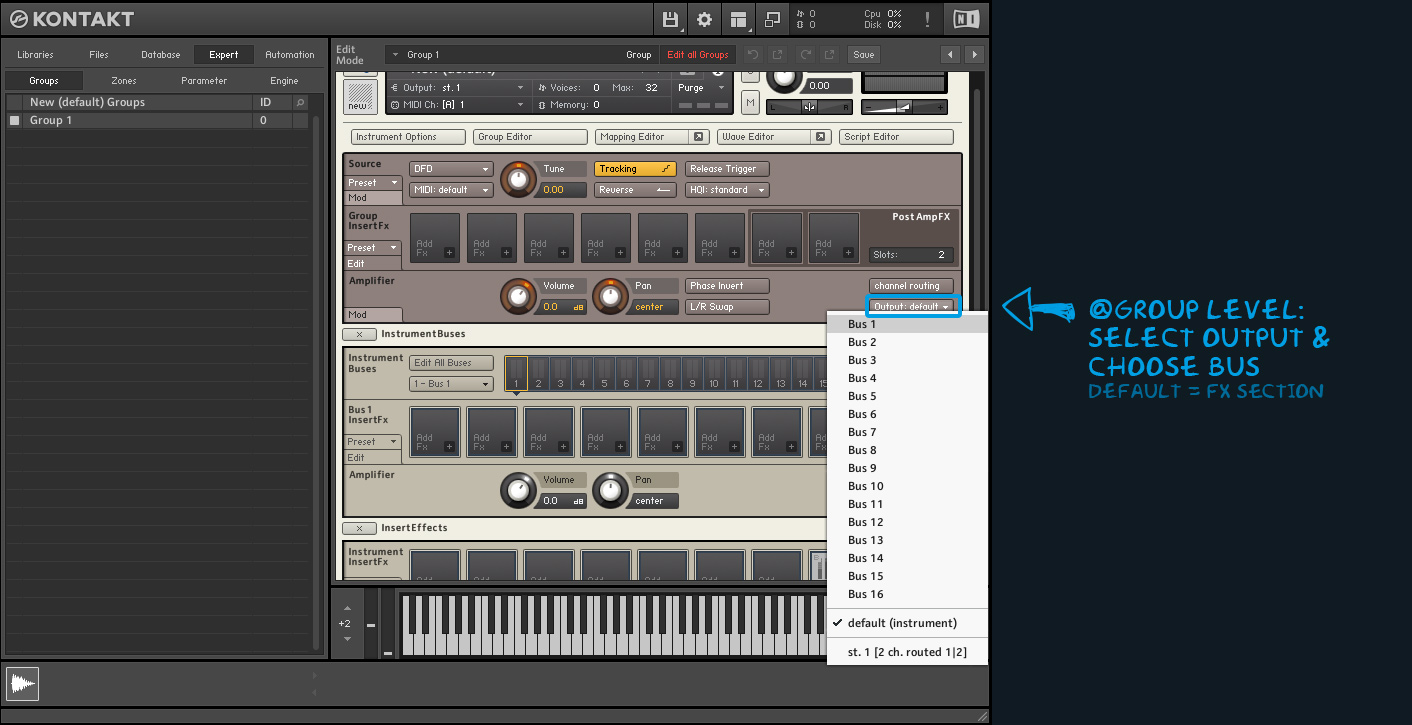

3. Routing via KSP
set_engine_par(parameter, value, group, slot, generic)

// to route the output signal of groups:
set_engine_par($ENGINE_PAR_OUTPUT_CHANNEL, <channel_selector>, <group>, -1, -1)

// to route the output signal of buses:
set_engine_par($ENGINE_PAR_OUTPUT_CHANNEL, <channel_selector>, -1, -1, $NI_BUS_OFFSET + [0-15])
via $ENGINE_PAR_OUTPUT_CHANNEL and set_engine_par() we can now route the signal to any output.
Thereby we can route it dynamically on specific events like on init, on note, on control, on async etc.
Parameter
here goes $ENGINE_PAR_OUTPUT_CHANNEL
set_engine_par(parameter, value, group, slot, generic)
Value
here goes the channel selector
set_engine_par(parameter, value, group, slot, generic)
Channel selectors
-1: routes to the default output, which usually is the instrument insert fx section. This is the default setting when creating a blank new instrument.
-2: “routes to the instrument output with the instrument insert effects bypassed.” – KSP reference guide
since Kontakt 6.4.1 there is a new Master FX section. When bypassing the insert FX the signal still passes through this Master FX Section
0,1,2,3,4,5,.. routes to one of the Kontakt “physical” instrument outputs. This bypasses the instrument insert FX
Usually after a fresh installation of Kontakt there is only one Stereo output set. You can add more instrument outputs manually also surround outputs.
since Kontakt 6.4.1 there is a new Master FX section. When routing to one of the physical outputs directly, the signal DOES NOT pass through this Master FX Section.
$NI_BUS_OFFSET + [0-15] routes to one of the 16 buses
Group
here goes the group index we want to address. The first group = 0. The second group = 1 and so on
set_engine_par(parameter, value, group, slot, generic)
Slot
in this case a slot is not needed. So we set it to -1
set_engine_par(parameter, value, group, slot, generic)
Generic
To rout the output signal of groups we set generic to -1.
If we want to route the output signal of bus 1 to 16 we set generic to $NI_BUS_OFFSET + [0-15]
set_engine_par(parameter, value, group, slot, generic)
KSP – GROUP OUTPUT ROUTING
on init
  set_engine_par($ENGINE_PAR_OUTPUT_CHANNEL, -1, 0, -1, -1)
end on
This routes the output signal of the first group to the instrument insert FX: default setting when opening a blank new instrument
on init
  set_engine_par($ENGINE_PAR_OUTPUT_CHANNEL, $NI_BUS_OFFSET + 0, 0, -1, -1)
end on
This routes the output signal of the first group to Bus 1.
$NI_BUS_OFFSET + [0-15] sets the bus. Whereas $NI_BUS_OFFSET + 0 equals Bus 1 and $NI_BUS_OFFSET +15 equals Bus 16
on init
  set_engine_par($ENGINE_PAR_OUTPUT_CHANNEL, $NI_BUS_OFFSET + 8, 2, -1, -1 )
end on
This routes the output signal of the third group to Bus 9
on init
  set_engine_par($ENGINE_PAR_OUTPUT_CHANNEL, 0, 0, -1, -1 )
end on
This routes the output signal of the first group to the first “physical” output. Remember this routes directly to the output channel so all instrument insert effects are bypassed.
on init
  set_engine_par($ENGINE_PAR_OUTPUT_CHANNEL, 0, 1, -1, -1 )
end on
If you have set a second instrument output this will route the output signal of the first group to the second of your “physical” instrument outputs
KSP – BUS OUTPUT ROUTING
on init
  set_engine_par($ENGINE_PAR_OUTPUT_CHANNEL, 0, -1, -1, $NI_BUS_OFFSET + 0 )
end on
This routes the output signal of Bus 1 to the first of your “physical” instrument outputs, bypassing the instrument insert FX
on init
  set_engine_par($ENGINE_PAR_OUTPUT_CHANNEL, -1, -1, -1, $NI_BUS_OFFSET + 4)
end on
This routes the output signal of Bus 5 to the instrument insert FX (default setting)
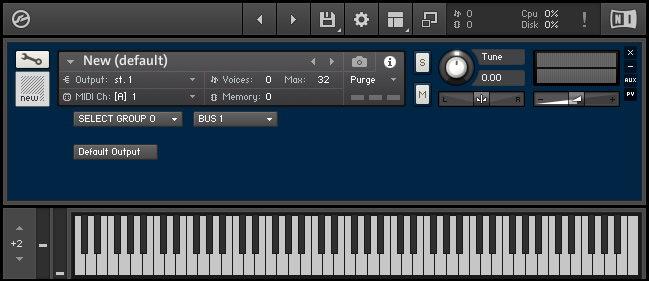
Example: dynamic bus routing via routing menu & button
the following creates a drop-down menu to select the buses and a button which selects the default output again.
premium content


Hinweis